---
title: "Keycloak for developers: how integration works"
description: "✅ Keycloak Integration Made Easy: Open-Source IAM with SSO, OAuth2 & OpenID. Here's how you can securely integrate Keycloak into your project! 🚀"
canonical_url: "https://www.blueshoe.io/blog/keycloak-integration-for-developers/"
---
> Index of every page on this site: [llms.txt](https://www.blueshoe.io/llms.txt)
In today's digital world, secure Identity and Access Management (IAM) is essential. But implementation can be complicated - Keycloak makes it simple! In this article, you'll learn how to integrate Keycloak with SSO, OAuth2 & OpenID Connect into your project - whether Django, Kubernetes or Node.js.
What is Keycloak?
Keycloak is an open-source IAM solution that supports Single Sign-On (SSO), user management, and Multi-Factor Authentication (MFA).
Benefits for developers:
- **Easy integration** with OAuth2, OpenID Connect & SAML
- **Top-notch security** with MFA & role-based access control (RBAC)
- **Scalable** – for small teams & large enterprises
Keycloak Integration: How to get started
Step 1: Set up your Keycloak server
- Download Keycloak as a Docker container or install it manually
- Create a realm for your project
- Add users and roles in the Keycloak Admin Console
Step 2: Connect Keycloak to your application
- **Django:** Use `pycloak` for easy OAuth2 integration
- **Spring Boot:** Use the Keycloak adapter for Spring Security
- **Node.js:** Connect Keycloak via `passport-keycloak` for authentication
Step 3: Use SSO & token-based authentication
- Implement **Single Sign-On (SSO)** via OpenID Connect
- Use **access tokens** to secure your APIs
- Enable **Multi-Factor Authentication (MFA)** for enhanced security
Best practices for secure Keycloak implementation
- **Enable SSL/TLS:** All connections to Keycloak must be encrypted
- **Use role-based access control (RBAC):** Prevents unauthorized access
- **Limit token lifetime:** Reduces risk from expired credentials
- **Keep it up to date:** Always use the latest version for max security
**Pro tip:** With our RAPID-Framework we implement Keycloak **35% faster**.
Real-world example: Keycloak in action
Integration into existing systems
Integrating Keycloak into existing systems is easy thanks to its flexible API and broad compatibility with frameworks like Spring Boot, [Django](https://www.blueshoe.io/technologies/python-django-agency/), Node.js, and more. Whether you're running in the cloud or on-premise, Keycloak adapts to your infrastructure. And since it's open source, it's fully customizable. At Blueshoe, for example, we built a handy [Cookie-Cutter Template](https://github.com/Blueshoe/keycloak-theme-template) to make theme customization super simple.
Practical Example: FondsFINANZ Broker Educational Platform
A concrete example of a successful Keycloak implementation is the backoffice world of the **FondsFINANZ Broker Educational Platform**, a Django-based [Kubernetes](https://www.blueshoe.io/our-services/migration-to-kubernetes/) application with various services. Here, a central Keycloak instance manages authentication for all services and ensures a uniform and secure user management. This setup enables developers to concentrate on business logic while Keycloak takes care of security.
In this context, [pycloak](https://github.com/Blueshoe/pycloak) plays a significant role. Through *pycloak*, we could integrate Keycloak seamlessly into the Django application using the [oauth2-proxy project](https://oauth2-proxy.github.io/oauth2-proxy/).
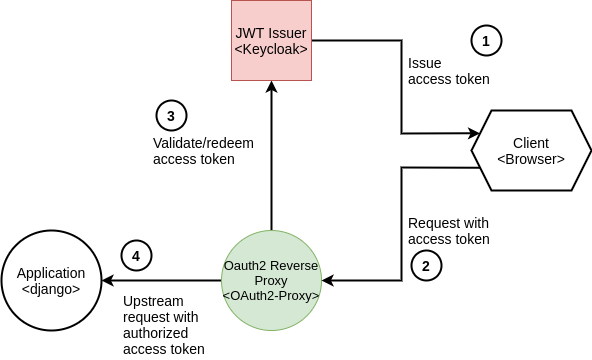
The diagram above shows how pycloak handles authentication in a Django app using *oauth2-proxy*. The client app first requests a resource and is intercepted by *oauth2-proxy*. If the user isn’t authenticated, they’re redirected to the Keycloak login page. Once authenticated, they get an access token to access the target app.
Real-world example: LUMA Delikatessen
Another great example is the [**LUMA Delikatessen**-Website](https://www.luma-delikatessen.ch/), built with Nuxt.js and [Django](https://www.blueshoe.io/technologies/python-django-agency/). Here, Keycloak is used as the central authentication solution to ensure both security and user-friendliness. Using our [keycloak-theme-template](https://github.com/Blueshoe/keycloak-theme-template), we customized the registration page and default Keycloak fields — for example, we added a birthdate field to enable birthday-based promotions. Here's how it looks:

Real-world example: LMU Munich Media Monitoring
Keycloak’s API also comes in handy — we use it for the [Munich Media Monitoring](https://m3.ifkw.lmu.de/) project at LMU. After a defined time, users are asked to reverify their email. Using Keycloak's User Profile feature, we added custom fields to track when users need to reverify. A Kubernetes cronjob queries the Keycloak API to find these users and resets the verification state. Next time a user logs in, Keycloak automatically prompts for email verification.
Why choose Blueshoe for your Keycloak integration?
We’ve been experts in open-source IAM solutions for over 10 years, helping businesses implement Keycloak securely. Plus, we offer [pycloak](https://github.com/Blueshoe/pycloak), our tailored Python package for easy Keycloak integration in Python projects. With pycloak, we’ve made Keycloak more accessible and developer-friendly than ever.
**Our advantages:**
- **35% faster implementation** thanks to our RAPID Framework
- **Custom Keycloak integrations** for [Django](https://www.blueshoe.io/technologies/python-django-agency/), [Kubernetes](https://www.blueshoe.io/our-services/migration-to-kubernetes/) & more
- **Deep expertise** in OAuth2, OpenID Connect & SAML
Secure your IAM project with Keycloak
Frequently Asked Questions
1. How do I integrate Keycloak into my existing app?
Keycloak offers several integration options:
- **Web apps:** Use Keycloak’s JS adapter or OAuth2 flow for secure logins
- **Backend APIs:** Implement OpenID Connect or OAuth2 for token validation
- **Microservices/Kubernetes:** Use oauth2-proxy or Keycloak as the cluster identity provider
- **Tip:** The Keycloak REST API enables fine-grained user management.
2. Which authentication protocols does Keycloak support?
Keycloak supports all common protocols for secure authentication:
- **OAuth2** (for API auth)
- **OpenID Connect** (for web apps & SSO)
- **SAML** (for legacy enterprise systems)
- **LDAP Integration** (for existing user directories)
- **Tip:** Choose the appropriate protocol depending on the application – OpenID Connect is usually best for web/mobile
3. How do I implement Role-Based Access Control (RBAC) in Keycloak?
Keycloak offers a flexible **role and permission system**:
- **Define roles and permissions** in the Keycloak console
- **Assign roles to users or groups** (e.g. admin, editor, viewer)
- **Validate roles in your code** by parsing the Keycloak token
- **Tip:** Use Keycloak’s “Authorization Services” for complex access rules
4. How can I run Keycloak locally for dev and testing?
You can run Keycloak locally using Docker or in standalone mode:
```bash
docker run -p 8080:8080 --name keycloak -e KEYCLOAK_ADMIN=admin -e KEYCLOAK_ADMIN_PASSWORD=admin quay.io/keycloak/keycloak start-dev
```
- **Advantages:** Fast setup for local development & tests
- **Tip:** If you use PostgreSQL or Kubernetes, configure your DB via env variables
5. How do I implement Single Sign-On (SSO) with Keycloak?
Keycloak enables SSO with OpenID Connect or SAML:
- Set up Keycloak as your identity provider
- Connect your apps via OpenID Connect
- Use one login across multiple apps — users log in once and access everything
- Tip: For migrating user accounts, use LDAP or a custom auth strategy
## Sitemap
See the full [sitemap](https://www.blueshoe.io/sitemap.md) for all pages.