
Table of Contents
- PostgreSQL Connections: Why Every Connection Is Expensive
- The Kubernetes Problem: HPA and Connection Explosions
- Architecture Deep Dive: Application-Side vs. Server-Side Pooling
- Kubernetes Deployment Strategies Compared
- Real-World Test: Native psycopg-pool in Django 5.1
- The Solution: Centralized PgBouncer in Kubernetes
- Production Results: 85% Fewer Database Connections
- Key Technical Limitations in Transaction Mode
- Decision Matrix: Which Pooling Approach Fits Your Architecture?
- Conclusion: Selecting the Right Pool for Your Architecture
- Frequently Asked Questions (FAQ)
Meet the Author

2026-11-03
Scaling PostgreSQL Connections in KubernetesDjango Database Connection Pooling: PgBouncer vs. Django 5.1
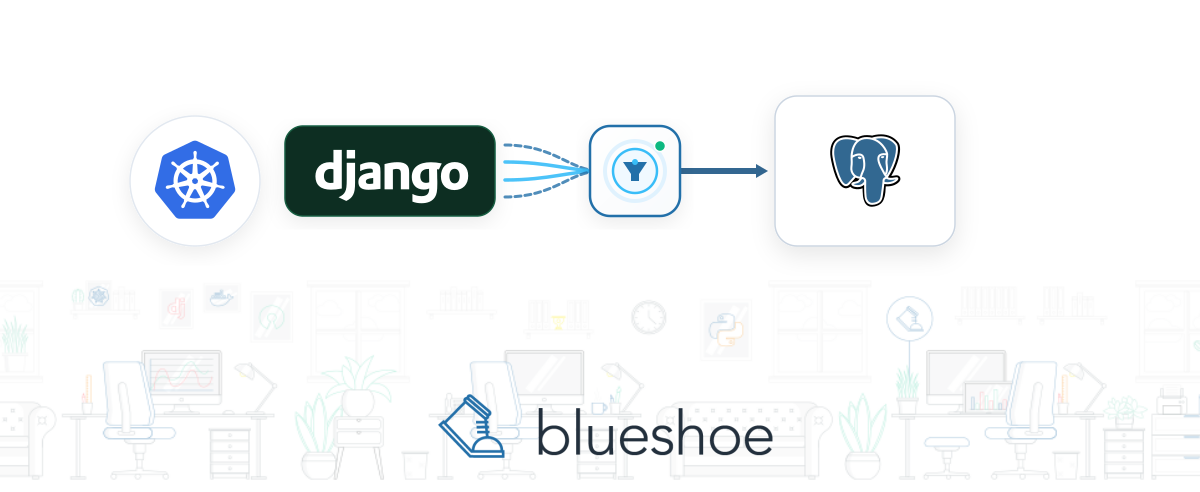
Django 5.1 introduced native connection pooling—yet in Kubernetes environments with horizontally scaled pods, it quickly hits architectural bottlenecks. We demonstrate how PgBouncer aggregates PostgreSQL connections globally, slashing active database connections by up to 85% in a real-world production system.
Prerequisites
You should have the following knowledge to use the article optimally:- Django Architecture: Configuration of
DATABASES,CONN_MAX_AGE, and database adapters likepsycopg(v3). - PostgreSQL Internals: The process-per-connection model (
fork()), shared memory,max_connections, and resource overhead. - Kubernetes Operations: Pod lifecycle, Horizontal Pod Autoscaling (HPA), K8s services, and microservices architecture.
- Connection Pooling Theory: Differences between application-side pooling (in-memory) and server-side reverse proxies (PgBouncer).
Questions or architectural feedback? Feel free to use the comment section below or reach out to our team for Cloud Application Development.
Operating scalable Python web applications on Kubernetes inevitably exposes a critical performance bottleneck: the maximum number of concurrent database connections.
In monolithic deployments with a fixed handful of application servers, this rarely poses an immediate issue. However, when transitioning to a containerized microservice architecture where dozens of pods scale dynamically based on real-time traffic, PostgreSQL is quickly pushed to its operational limits.
Django 5.1 introduced long-anticipated native connection pooling powered by psycopg-pool. Yet in containerized cluster environments, this feature often proves to be an illusion of safety. In this guide, we examine why PostgreSQL connections are fundamentally expensive, why application-side pooling breaks under Kubernetes autoscaling, and how our team as a Python and Django agency utilized PgBouncer to reduce production database connections by up to 85%.
PostgreSQL Connections: Why Every Connection Is Expensive
To understand why connection starvation occurs under load, we must inspect the process architecture of PostgreSQL.
The Process-per-Connection Model
Unlike databases like MySQL or Microsoft SQL Server that employ lightweight worker threads, PostgreSQL relies on a traditional process-per-connection model. For every individual TCP connection initiated by a client, the PostgreSQL master process forks an independent operating system process (postgres: worker).
+-------------------------------------------------------------+
|                      PostgreSQL Host                        |
|                                                             |
|  +--------------------+  +--------------------+             |
|  | Main Postgres Proc |  | Shared Buffer Pool |             |
|  +---------+----------+  +---------+----------+             |
|            |                       |                        |
|            | fork()                | Shared Memory          |
|            v                       v                        |
|  +--------------------------------------------+             |
|  | Backend Process #1  (RAM & CPU Overhead)   |             |
|  +--------------------------------------------+             |
|  | Backend Process #2  (RAM & CPU Overhead)   |             |
|  +--------------------------------------------+             |
|  | ... Backend Process #N                     |             |
+-------------------------------------------------------------+
Each forked backend process carries measurable operational costs:
- OS Overhead: Invoking
fork()at the operating system level is CPU-intensive. - Memory Footprint: PostgreSQL allocates dedicated memory per connection—typically 2 to 10 MB RAM base overhead, plus session-specific
work_memfor sorting and hash joins. - Connection Handshake: TCP handshakes, TLS/SSL encryption negotiation, authentication, and session parameter initialization (
TimeZone,search_path) introduce latency. - Context Switching: With hundreds of concurrent OS processes, the CPU kernel spends excessive clock cycles juggling processes (context switching) rather than executing SQL queries.
As a result, even if hundreds of connections sit completely idle (idle in transaction or idle waiting for query), they continue consuming valuable memory and burdening the database scheduler.
The Kubernetes Problem: HPA and Connection Explosions
In Kubernetes, this bottleneck escalates exponentially through the combination of replica scaling and the Horizontal Pod Autoscaler (HPA).
In our production environments, we run django-hurricane as our cloud-native application runner for Django (see our guide on Django Hurricane in Kubernetes). When traffic surges, Kubernetes scales pods up automatically.
Without a centralized connection pool, every pod and worker process maintains its own independent TCP connections to the database. Consider the baseline metrics from one of our production client architectures prior to optimization:
- E-Commerce Webshop: Multiple microservices distributed across 18 pods / replicas
- Content Website: Editorial portal running across 3 pods / replicas
The resulting connection counts in production:
- Webshop Database: Consistently at ~120 active connections
- Website Database: Consistently at ~35 active connections
Whenever marketing promotions or seasonal spikes caused the HPA to launch additional replicas, PostgreSQL approached its max_connections ceiling, risking connection timeouts and cascading application crashes.
Architecture Deep Dive: Application-Side vs. Server-Side Pooling
Choosing the right scaling strategy requires distinguishing between two fundamental pooling patterns:
A) Application-Side Pooling (Django 5.1 / psycopg-pool)
+-----------------------+     +-----------------------+
|  Pod 1                |     |  Pod 2                |
|  +-----------------+  |     |  +-----------------+  |
|  | psycopg-pool    |  |     |  | psycopg-pool    |  |
|  | (Local Pool)    |  |     |  | (Local Pool)    |  |
|  +--------+--------+  |     |  +--------+--------+  |
+-----------|-----------+     +-----------|-----------+
            | (5 Connections)             | (5 Connections)
            +--------------+--------------+
                           v
              +-------------------------+
              |      PostgreSQL DB      |
              | (Total: 10 Connections) |
              +-------------------------+

-------------------------------------------------------

B) External Pooling (PgBouncer)
+-----------------------+     +-----------------------+
|  Pod 1                |     |  Pod 2                |
|  (Short-lived /       |     |  (Short-lived /       |
|   Transient Conns)    |     |   Transient Conns)    |
+-----------+-----------+     +-----------+-----------+
            |                             |
            +--------------+--------------+
                           v
              +-------------------------+
              |    Central PgBouncer    |
              |    (Transaction Pool)   |
              +------------+------------+
                           | (2 Connections)
                           v
              +-------------------------+
              |      PostgreSQL DB      |
              | (Total: 2 Connections)  |
              +-------------------------+
Pattern A: Application-Side Pooling (Django 5.1 with psycopg-pool)
Pooling occurs within the memory space of the Python application process. The application draws connections from a local reservoir of pre-warmed sockets.
- Pros: No additional infrastructure component required; negligible latency between Python code and the local pool.
- Cons: The pool is completely isolated. Each pod manages its own pool with zero awareness of neighboring pods or overall database capacity.
Pattern B: Server-Side / External Pooling (PgBouncer)
A lightweight, high-performance proxy sits between the Django pods and the PostgreSQL database.
- Pros: Hundreds or thousands of client connections from any number of pods are multiplexed onto a minimal set of actual PostgreSQL backend processes (connection multiplexing).
- Cons: Introduces a minimal network hop; imposes restrictions on certain session-level PostgreSQL features (such as named cursors and prepared statements in transaction mode).
Kubernetes Deployment Strategies Compared
When deploying connection poolers in Kubernetes, teams can adopt three architectural approaches:
| Strategy | Architecture | Pros | Cons | Best Suited For |
|---|---|---|---|---|
| 1. Native Django 5.1 Pooling Only | Pod → Postgres | Zero extra infrastructure; configuration handled purely in settings.py. | No global pooling; connection counts scale linearly with pods; risk of connection explosions. | Monoliths on bare metal/VMs, or static workloads with 1–3 pods. |
| 2. PgBouncer as a Sidecar | Pod (App + PgBouncer) → Postgres | Clean pod-level encapsulation; traffic remains local over localhost. | Still lacks global consolidation across distinct microservices; each pod ties up DB connections. | When deployments must remain strictly isolated and network latency is critical. |
| 3. Centralized PgBouncer Service | Pods → PgBouncer Cluster → Postgres | Maximum multiplexing efficiency; establishes a hard ceiling on database connections. | Separate cluster component; requires high-availability (HA) redundancy. | Standard recommendation for Kubernetes, microservices, and HPA workloads. |
Real-World Test: Native psycopg-pool in Django 5.1
Django 5.1 added official support for the built-in pooling features of the modern psycopg (v3) driver. Enabling it requires installing psycopg[pool] and updating the database configuration in settings.py:
# settings.py (Django 5.1+ with psycopg v3)

DATABASES = {
    "default": {
        "ENGINE": "django.db.backends.postgresql",
        "NAME": "webshop_db",
        "USER": "django_user",
        "PASSWORD": "secretpassword",
        "HOST": "postgres-service",
        "PORT": "5432",
        "OPTIONS": {
            "pool": {
                "min_size": 2,
                "max_size": 4,
                "timeout": 10,
            }
        },
    }
}
Production Results with Native Pooling
We tested this setup under realistic production load on our webshop services. The outcome was sobering:
- Default Configurations Caused Immediate Crashes:
Under peak loads, requests rapidly timed out waiting for connection acquisition:django.db.utils.OperationalError: couldn't get a connection after 10 seconds - Tuning Failed to Reduce Global Load:
Increasingmax_sizeandtimeoutstabilized individual pods, but overall database connection counts remained dangerously elevated. - Connection Explosions During HPA Rollout:
When rolled out across all 18 webshop replicas, the total number of open database connections actually exceeded previous unpooled levels.
Why Does Application-Side Pooling Fail in Kubernetes?
The failure stems from simple multiplicative math:
Open Connections = Pod Count × Workers per Pod ×
min_size
If 18 pods run with 4 workers each, and each worker maintains a pool with min_size = 2 and max_size = 6, the cluster holds 18 × 4 × 2 = 144 database connections open even when completely idle. If the HPA scales to 30 pods, connections quickly surge toward 720 (30 * 4 * 6). Instead of conserving connections, local pooling creates a rigid, artificially high connection floor.
Key Takeaway for Cloud Architects: In-process pooling is structurally incompatible with horizontally autoscaled microservice clusters. True connection pooling requires a centralized coordinator that multiplexes traffic across all pods.
The Solution: Centralized PgBouncer in Kubernetes
To achieve cluster-wide connection multiplexing, we deployed a centralized PgBouncer instance running in transaction pooling mode.
In our infrastructure, we manage PostgreSQL using the Zalando Postgres-Operator, which runs directly inside Kubernetes and includes first-class support for PgBouncer.
1. Declaring PgBouncer in the Zalando Operator
Enabling PgBouncer is handled declaratively in the postgresql Custom Resource Definition (CRD):
apiVersion: "acid.zalan.do/v1"
kind: postgresql
metadata:
  name: webshop-db-cluster
spec:
  teamId: "blueshoe"
  volume:
    size: 50Gi
  numberOfInstances: 2
  users:
    webshop_user: []
  databases:
    webshop_db: webshop_user
  preparedDatabases:
    webshop_db: {}

  # Enable PgBouncer connection pooler:
  enableConnectionPooler: true
  connectionPooler:
    numberOfInstances: 2       # High-availability configuration
    mode: transaction          # Maximum multiplexing efficiency
    resources:
      requests:
        cpu: 200m
        memory: 128Mi
      limits:
        cpu: 500m
        memory: 256Mi
The operator automatically creates a corresponding Kubernetes Service (e.g., webshop-db-cluster-pooler) that routes traffic from Django pods to the PgBouncer pooler.
2. Critical Django Settings ("Gotchas")
Connecting Django to a PgBouncer instance in transaction pooling mode requires adjusting two mandatory settings alongside updating the database HOST:
# settings.py - Django configuration for PgBouncer Transaction Pooling

DATABASES = {
    "default": {
        "ENGINE": "django.db.backends.postgresql",
        "NAME": "webshop_db",
        "USER": "webshop_user",
        "PASSWORD": "secretpassword",
        # Route connections to the PgBouncer K8s Service:
        "HOST": "webshop-db-cluster-pooler",
        "PORT": "5432",

        # GOTCHA 1: Django holds persistent connections by default.
        # With Transaction Pooling, CONN_MAX_AGE MUST be set to 0!
        "CONN_MAX_AGE": 0,

        # GOTCHA 2: Server-side named cursors require a dedicated session.
        # They MUST be disabled for Transaction Pooling (Django 4.2+):
        "DISABLE_SERVER_SIDE_CURSORS": True,
    }
}
Why CONN_MAX_AGE = 0 Is Mandatory
By default, Django attempts to keep TCP connections alive across multiple HTTP requests via CONN_MAX_AGE. When routed to PgBouncer, idle Django workers monopolize PgBouncer's client connection slots. Setting CONN_MAX_AGE = 0 forces Django to release its client socket after each request. Because PgBouncer sits locally in the cluster with sub-millisecond response times while retaining persistent backend sockets to PostgreSQL, this overhead is imperceptible.
Why DISABLE_SERVER_SIDE_CURSORS = True Is Mandatory
For memory-heavy queries (such as .iterator()), Django employs server-side named cursors (DECLARE name CURSOR FOR ...). These cursors are bound to a specific PostgreSQL session. In transaction pooling mode, PgBouncer assigns available backend connections dynamically between individual transactions and statements. If the underlying database connection swaps mid-query, execution crashes. Setting DISABLE_SERVER_SIDE_CURSORS = True prevents this failure entirely.
Production Results: 85% Fewer Database Connections
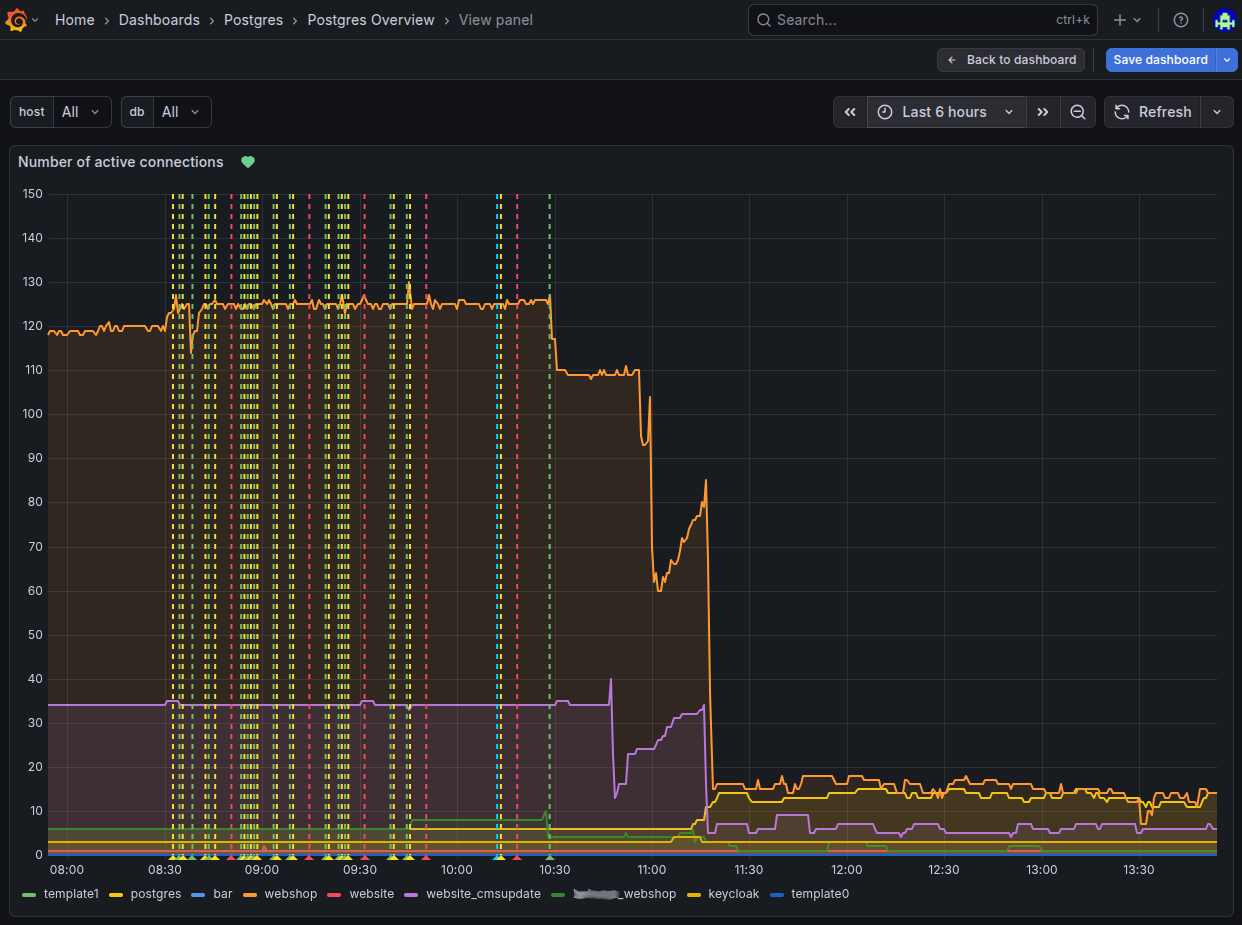
Deploying PgBouncer delivered immediate, dramatic improvements visible across our Grafana dashboards. Connection alert storms ceased instantly:
Real-World Cluster Metrics
| Service / Environment | Pod Count | Connections Without PgBouncer | Connections With PgBouncer | Total Reduction |
|---|---|---|---|---|
| Webshop DB (18 Replicas) | 18 Pods | ~120 active connections | 10 to 20 connections | 83 – 91% Reduction |
| Website DB (3 Replicas) | 3 Pods | ~35 active connections | under 10 connections | ~75% Reduction |
Despite fluctuating traffic volumes and aggressive autoscaling via HPA, actual backend connections on PostgreSQL remained stable in the low double digits.
Key Technical Limitations in Transaction Mode
While transaction pooling yields the highest connection consolidation, it restricts certain PostgreSQL features:
- Prepared Statements:
Older PgBouncer releases lacked support for prepared statements in transaction mode. Modern releases (PgBouncer 1.21+) support protocol-level prepared statements (max_prepared_statements > 0). However, pairing PgBouncer withDISABLE_SERVER_SIDE_CURSORS = Trueremains the recommended configuration in Django. LISTEN/NOTIFY:
PostgreSQL's asynchronous publish-subscribe mechanism is strictly session-bound. Applications leveragingLISTEN/NOTIFYmust establish direct database connections or route through a separate session-mode pool.- Database Migrations (
manage.py migrate):
Schema migrations execute DDL statements, table locks, and operations likeCREATE INDEX CONCURRENTLYthat are incompatible with transaction pooling. Best Practice: CI/CD deployment pipelines should execute migrations directly against the primary PostgreSQL port, bypassing PgBouncer. - Advisory Locks:
Session-level advisory locks (pg_advisory_lock) are unreliable in transaction mode. Use transaction-scoped locks (pg_advisory_xact_lock) instead.
Decision Matrix: Which Pooling Approach Fits Your Architecture?
                    Are your Django apps scaling on Kubernetes / HPA?
                                           |
                           +---------------+---------------+
                           |                               |
                          YES                              NO
                           |                               |
                           v                               v
               [ Centralized PgBouncer ]           Monolithic setup on a
               - Transaction pooling               fixed VM or server?
               - Ideal for K8s & HPA                       |
                                           +---------------+---------------+
                                           |                               |
                                          YES                              NO
                                           |                               |
                                           v                               v
                               [ Django 5.1 psycopg-pool ]       [ PgBouncer Sidecar ]
                               - Minimal overhead                - Multi-threaded setups
                               - Zero extra infrastructure       - Isolated pods
| Evaluation Criterion | Django 5.1 Native (psycopg-pool) | PgBouncer as a Sidecar | Centralized PgBouncer Cluster |
|---|---|---|---|
| Infrastructure Overhead | None (pure Python) | Low (container per pod) | Moderate (dedicated K8s deployment/operator) |
| Multiplexing Efficiency | Low (per-process only) | Moderate (per-pod only) | Maximum (global across all cluster services) |
| HPA Scalability | Poor (multiplicative explosion) | Moderate | Exceptional (safeguards DB capacity) |
| Feature Compatibility | 100% of PostgreSQL features | Nearly 100% (mode-dependent) | High compatibility with proper Django configuration |
Conclusion: Selecting the Right Pool for Your Architecture
Native psycopg-pool support in Django 5.1 represents a significant step forward for traditional monolithic applications hosted on dedicated virtual machines or bare-metal instances, eliminating third-party dependencies in small-to-midsize stacks.
However, in dynamically scaling Kubernetes and cloud-native environments, application-side pooling faces insurmountable architectural limits. Because each pod operates in isolation, horizontal autoscaling inevitably floods PostgreSQL with redundant connections.
For production Django clusters, deploying a centralized PgBouncer remains the premier industry standard. Supported by Kubernetes operators like the Zalando Postgres-Operator, implementation is straightforward—and achieving an 85% reduction in database connections delivers the resilience and scalability modern applications demand.
Looking to optimize your database performance or modernize your cloud infrastructure? Explore our expertise in Migration to Kubernetes and comprehensive Cloud Native Consulting.
Frequently Asked Questions (FAQ)
Why is native connection pooling in Django 5.1 often insufficient in Kubernetes?
Django 5.1 leverages psycopg-pool at the application and process level. Each individual pod manages its own isolated connection pool. Under Horizontal Pod Autoscaling (HPA), the minimum reserved connections multiply across pods (Pods * min_size), triggering connection explosions and overwhelming the PostgreSQL database under load.
What is the difference between persistent connections (CONN_MAX_AGE) and true connection pooling?
CONN_MAX_AGE keeps established TCP connections open per thread or worker for a fixed duration to avoid repeated handshakes. In contrast, true connection pooling (such as PgBouncer) maintains an interchangeable pool of reusable database sessions, multiplexing hundreds of incoming client requests onto a small number of physical backend processes.
Which PgBouncer pooling mode is best for Django web applications?
Transaction pooling is strongly recommended for maximum connection efficiency. In transaction mode, a physical PostgreSQL connection is allocated exclusively for the duration of a single transaction and returned to the pool immediately upon completion. Session pooling offers minimal consolidation, while statement pooling is incompatible with Django transactions.
Why must CONN_MAX_AGE be set to 0 when using PgBouncer in transaction mode?
If CONN_MAX_AGE is greater than 0, Django holds onto persistent TCP connections to PgBouncer, exhausting PgBouncer's client connection slots. Setting CONN_MAX_AGE = 0 ensures Django closes client connections after each HTTP request, while PgBouncer keeps the physical connections to PostgreSQL open in its pool.
Why must DISABLE_SERVER_SIDE_CURSORS be set to True in Django with PgBouncer?
Django uses server-side cursors (named cursors) for operations like .iterator(). These cursors rely on a persistent PostgreSQL session state. In transaction pooling, PgBouncer can assign different backend connections between SQL statements, which causes queries to fail unless DISABLE_SERVER_SIDE_CURSORS is set to True.
How should Django database migrations (manage.py migrate) be executed with PgBouncer?
Database migrations should bypass PgBouncer in transaction mode and connect directly to the primary PostgreSQL service (or a dedicated session-mode pool). Migrations frequently execute DDL operations, advisory locks, and schema changes that are unsupported in transaction pooling.